
How to Search the Shelby County Court Docket
Begin with iDocket's simple search, the main online entry point. Its county list gives you two Shelby County lanes. One covers the district courts and one covers the county-level court. Match the lane to the court named on your paper. Then search by party name or case number. A partial name widens the net when the full spelling is uncertain. Paid tiers of the vendor add filters for court, category, case type, party role, and attorney. They also cover filing dates, disposition dates, and Soundex for similar spellings.
Treat any online result as a locator rather than a certified file. Case-number display and full case history may sit behind a subscription on iDocket. A Shelby County court docket search that comes up empty calls for fewer filters or the other lane. Still nothing? Call the clerk whose office holds the case. Anyone tracking a hearing date should confirm it with the clerk or court coordinator. An online calendar can omit a setting or change after you view it.
- Read the citation, notice, or caption and identify the court.
- Choose the Shelby district or county lane in iDocket.
- Search a party name, trying a partial spelling if needed.
- Review the style, filing date, action, and available case events.
- Ask the proper clerk for a current setting or certified copy.
Start With the Shelby County Court
The name "Shelby County" alone will not tell you which office holds a file. Felonies, family cases, juvenile matters, and major civil suits filed in the 123rd or 273rd Judicial District Court belong to the District Clerk. A constitutional County Court matter routes instead to the County Clerk. Traffic citations, evictions, and small claims stay with the justice court of their numbered precinct. City ordinance violations and municipal tickets go back to the city court that issued them.
Quick check: Use the exact court name and case number printed on the paper. A payment or record request sent to another Shelby County court may not reach the file.
What a Shelby County Court Docket Shows
Think of a Shelby County court docket as a structured trail of case activity. The historic district trial list used the headers Caseno, Filed On, Style, Action, and Attorneys. A live iDocket result may add case events, party roles, status, filings, and ledger data. Read each field narrowly. "Filed On" marks the date the case was filed, not the date of every hearing, and "Style" is just the caption, not proof of where each named party now stands.
| Caseno | The court-assigned identifier used to distinguish the case. |
|---|---|
| Style | The case caption, which identifies the named sides or parties. |
| Filed On | The filing date shown for the case or listed item. |
| Action | A category or action label that must be read in case context. |
| Attorneys | Counsel listed on the artifact; a name may not prove current representation. |
| Case history | A chronological event view that may require paid iDocket access. |
Two Shelby County iDocket Lanes
The iDocket county list shows both "Shelby County District" and "Shelby County County." The two rows reflect the split clerk system. Pick the wrong row and you may get no match even though the case exists. The vendor also posts a "last new case filed" date. That figure reflects the newest case the database lane received. It is not the filing date of the case you want.
iDocket also displays cumulative totals. They run to 24,914 district matters and 27,471 county matters. Those numbers measure the vendor's indexed stock. They do not measure the current pending caseload. They promise nothing about complete public access. Restricted records stay out of view. Detail can require an account tier, and a new filing may lag before it appears. The totals prove both court levels participate. Verify the actual record with its clerk.
Which Shelby County Courts Keep Dockets
Shelby County has two general-jurisdiction trial courts: the 123rd and 273rd Judicial District Courts. Below them sits the constitutional County Court, which handles county-level work that Texas law allows. Five Justice of the Peace precincts carry the statutory lower-court load. Official directory material also lists municipal courts in Center, Tenaha, and Timpson. Appeals climb a separate ladder to the Twelfth Court of Appeals. Federal filings fall outside this state-court map entirely.
| Court | Docket Covers | Where to Search |
|---|---|---|
| 123rd and 273rd District Courts | District criminal, civil, family, and juvenile cases | iDocket and District Clerk |
| Constitutional County Court | County criminal, civil, and probate work as applicable | County Clerk and its public-record link |
| Justice Courts, Precincts 1 through 5 | Traffic, fine-only criminal, eviction, and small claims matters | The precinct shown on the citation or filing |
| Center, Tenaha, and Timpson Municipal Courts | City traffic, ordinance, and other fine-only matters | The issuing municipal court |
Two Shelby County Courthouse Addresses
Two documented Center addresses serve different needs. Current district-court pages place the 123rd and 273rd District Courts at 200 San Augustine Street, Suite 3. The District Clerk is at the same street address in Suite B. The County Clerk, by contrast, is at 124 Austin Street. That is also the address tied to the historic 1885 Shelby County Courthouse record.
The distinction matters before a visit or mailed request. Sending a district-court pleading request to the County Clerk because its office sits in the historic courthouse can add delay. For a district file, use the District Clerk. For a constitutional County Court file or the County Clerk's linked public-record series, use the County Clerk. Office hours and entry rules should be checked with the destination because no unified parking, screening, public-terminal, or same-day certification policy was located.
The Texas Historical Commission Atlas record documents the older courthouse and its historic designations.
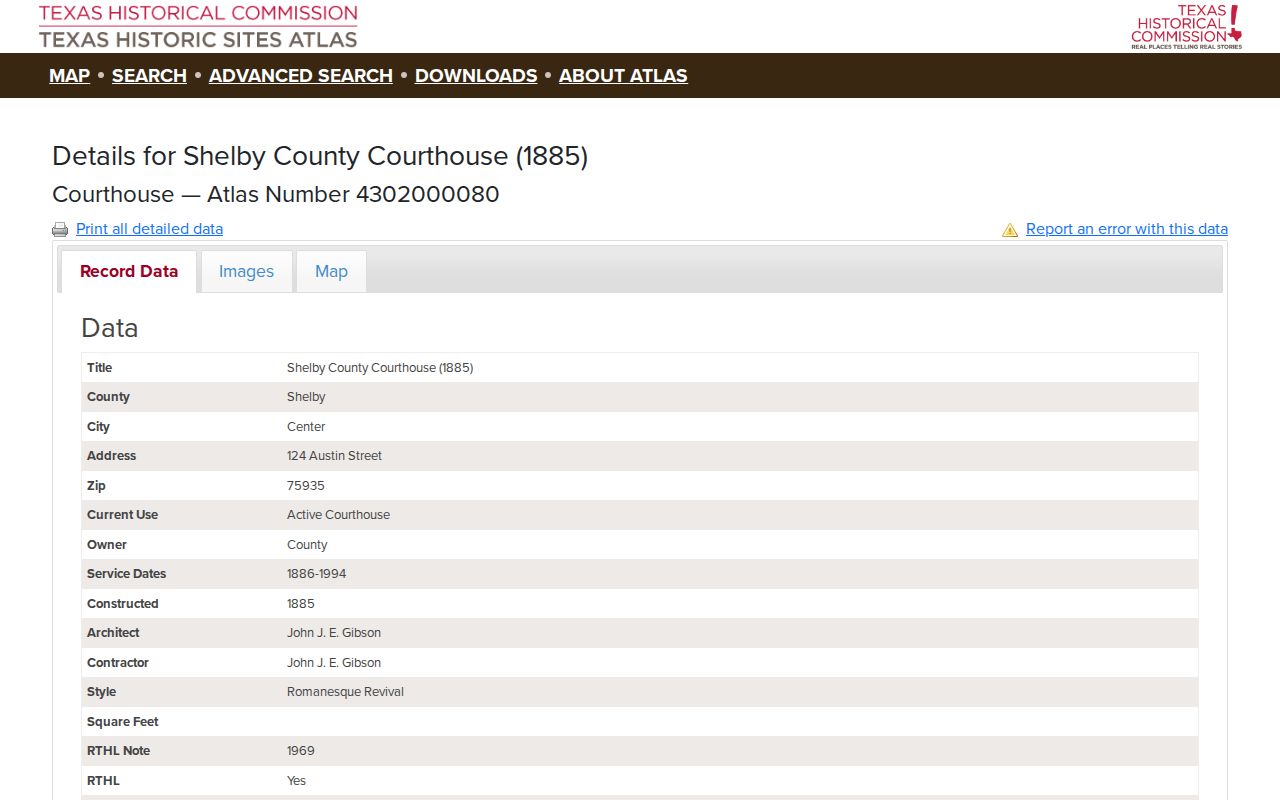
That record covers the building's history and designations. It is not a guide to the active district courtroom complex. Use the current addresses above for filings and visits.
Finding Shelby County Court Dates and Settings
A case-history line may list a hearing, trial, pretrial event, docket call, or another setting. Those terms are not interchangeable. A docket call is often a case-management step used to judge readiness and set scheduling. A reset moves a date but never dismisses the case. The county's own pages for District Court Settings, Docket Calls, and Trial Settings exist as shells. They lack complete live lists.
Use an iDocket calendar if one is available, then confirm with the clerk or coordinator. The historical Shelby docket-call PDFs show why care matters. They contained date-specific trial and pretrial sequences, confirmation steps, and continuance rules. Those old lists teach the workflow but are not current calendars. The full Shelby County court calendar walkthrough names the best source for each court. It also says what to do when a setting is absent.
When Shelby County Settings Look Empty
A blank settings page is not proof that court is closed. It may simply mean no live list was posted. The page may sit between updates, or the schedule may now travel through a different channel. Do not fill the gap with a date from a 2016 or 2017 PDF. Those are historical artifacts, and their deadlines have long since passed.
Call instead. The 123rd District Court answers at 936-598-9928, and the 273th District Court at 936-598-3201. If you have counsel, follow counsel's directions too. Ask for the case number, the type of setting, the date, the time, and the courtroom. Also ask whether a later order changed any of it. Write down which office confirmed the details. That small step keeps a calendar listing from being mistaken for a court order.
Public Access to Shelby County Court Dockets
Texas opens much of its court record to the public. The Texas Public Information Act, though, is only one piece of the framework. Judicial records also answer to court rules, statutes, clerk custody, sealing orders, and confidentiality provisions. So a docket entry can sit in plain view. An image or part of the underlying file may stay restricted. Juvenile records call for extra care. So do protected addresses, sealed civil material, and sensitive family information.
Key Rules:
Texas Rules of Judicial Administration, Rule 12 governs access to judicial records and recognizes exceptions.
Texas Family Code Chapter 58 limits access to juvenile justice information.
Texas Rule of Civil Procedure 76a addresses sealing civil court records.
Shelby County Search Versus re:SearchTX
iDocket is where a Shelby County docket search usually begins. re:SearchTX is the statewide judicial repository for registered users, and what you can see there depends on account role, court integration, and record limits. Neither tool replaces the clerk. The Office of Court Administration keeps no local case files, and its own public guidance points requesters to the district clerk, county clerk, justice court, municipal court, or appellate court where the case was filed.
Turn to re:SearchTX when a Shelby County court docket is visible to your account and the wider state view helps. Use iDocket for its named Shelby County lanes. If a search comes up empty, check the spelling, drop narrow filters, and try the correct court tier before deciding the file does not exist. For a filed-stamped pleading, a judgment, or a certified record, the final request goes to the clerk.
The Shelby County Clerk and Docket Records
Shelby County runs on a split-clerk system. The District Clerk is the first records contact for the 123rd and 273th District Courts. The current county page names Dee Dee Green as district clerk. An older OCA verification listed a prior clerk and email, so confirm current contact details on the county page. The County Clerk, identified as Jennifer Fountain, keeps the constitutional County Court records. She also supplies the county's official public-record search link.
When you contact the clerk, ask them to confirm the case number and quote the cost of an uncertified copy, a certified copy, or a clerk's record. Shelby County publishes no complete local fee sheet. It posts no electronic-delivery promise and no same-day turnaround rule. A statutory amount may cover only one piece of an order. Getting a quote up front prevents the free iDocket name search from being mistaken for proof that copies or certification are free too.
Shelby County District Clerk
200 San Augustine Street, Suite B
Center, TX 75935
936-598-4164
Shelby County Clerk
124 Austin Street, P.O. Box 1987
Center, TX 75935
936-598-6361
Shelby County's 2019 iDocket Milestone
The Shelby District Clerk announced a local iDocket launch on November 20, 2019. That milestone explains why the vendor now appears in OCA clerk-system material. It also explains why an online name search is part of modern access to Shelby County court records. It did not merge anything. District and county rows remain distinct. The lower courts still run their own operational dockets.
eFileTexas does a different job. It is the Texas trial-court filing channel. Filers submit documents there through electronic filing service providers. Filing there is not the same as pulling a full public case history. A filer should keep the envelope or filing details. Then verify acceptance in the court record. A public searcher should use iDocket or re:SearchTX, then the clerk. Do not treat the filing portal as a historical docket database.
Shelby County Docket Copy Costs
Texas fee statutes give useful anchors. The final charge depends on what you actually order. Government Code Chapter 51 sets a $5 district-clerk search charge in the circumstances that law describes, a $1-per-page clerk's record fee for an appeal, and an $8 abstract-of-judgment fee. Certification and page charges can stack separately. None of these prices covers simply clicking an online result.
| Request | Research anchor | Best next step |
|---|---|---|
| Existence search without docket number | $5 statutory district-clerk anchor | Ask whether the request fits the current provision |
| Clerk's record on appeal | $1 per page | Confirm the appellate record scope |
| Abstract of judgment | $8 | Distinguish it from a certified judgment copy |
| Certified or electronic copy | No complete local quote found | Request format, page, seal, and delivery costs |
Court Dockets by City in Shelby County
The official 2020 Census incorporated-place table produces four city profiles for Shelby County, not five. They are Center, Timpson, Tenaha, and Joaquin. Shelbyville sits outside the incorporated-place list, so it gets no city page. Court jurisdiction differs by city as well. Center, Timpson, and Tenaha each have municipal-court routes in current official material. Joaquin has none listed. Joaquin residents take city questions to city administration. Court matters go to the court named on the paper, often JP Precinct 3 for relevant justice-court cases.
Center Court Docket
5,678 · Municipal Court and main county-court access point
Timpson Court Docket
989 · Municipal Court at City Hall and JP Precinct 5
Tenaha Court Docket
989 · Municipal directory route and JP Precinct 4
Joaquin Court Docket
824 · JP Precinct 3 route; no municipal court located
Map and Directions to the Shelby County Courthouse
123rd and 273rd Judicial District Court records are kept at the active district-court complex, 200 San Augustine Street, in Center. The District Clerk's counter is in Suite B, and the district courtrooms are in Suite 3 of the same building. The historic 1885 Shelby County Courthouse at 124 Austin Street is a separate documented location and houses the County Clerk's office instead.
Shelby County District Clerk
200 San Augustine Street, Suite B
Center, TX 75935
936-598-4164
Monday through Friday, 8:00 a.m. to 4:30 p.m.
No official source describes a public-terminal inventory, floor map, parking, or security-screening procedure for this building, so call ahead about access or accommodation needs. Because the County Clerk's office sits at the separate 124 Austin Street address, a county-court or probate visit needs its own trip.